Web Apps
11 min read
WhatsApp Business API Integration in Dubai (2026)
How to set up the WhatsApp Business API in the UAE in 2026: per-message pricing, Meta/BSP approval, TDRA & PDPL compliance, and custom CRM integration.

By NxFold
Updated 21 Oct 2026
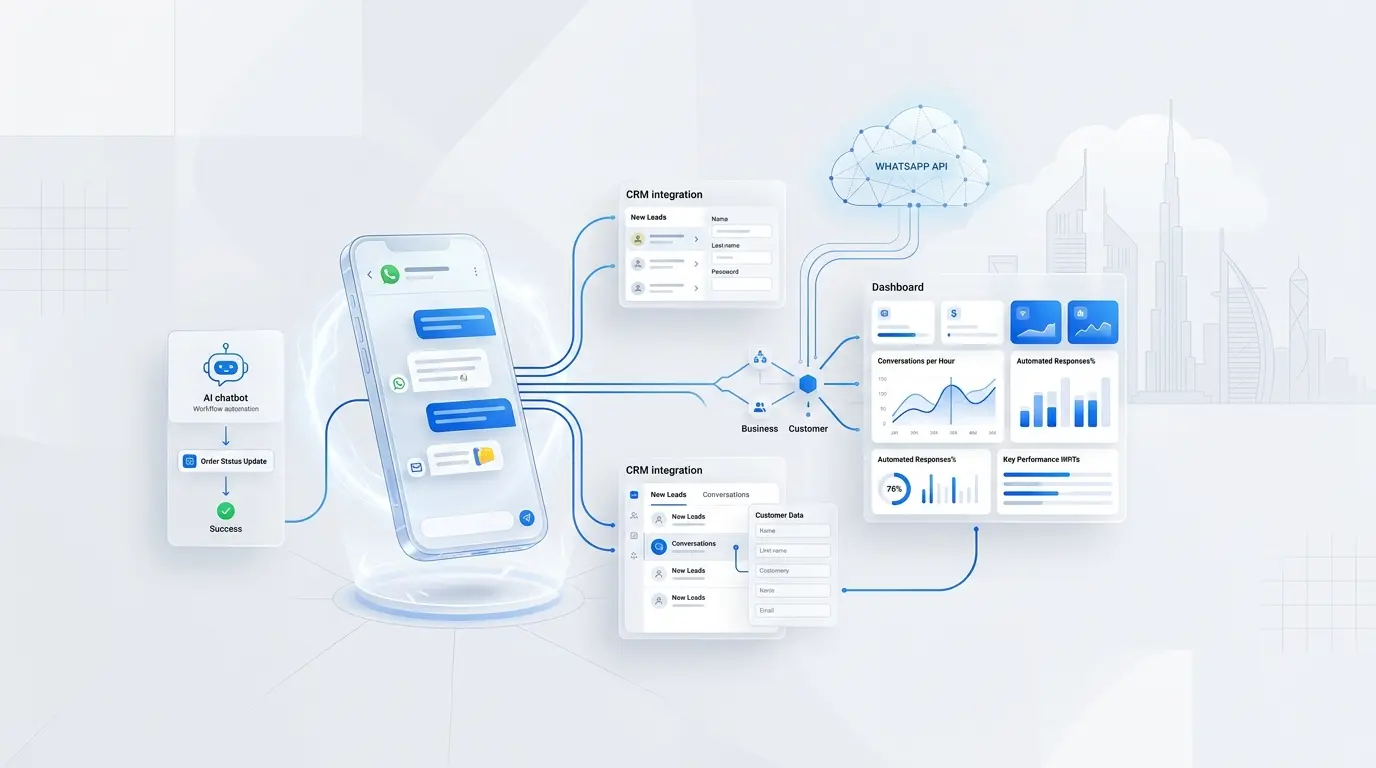
The WhatsApp Business API is the enterprise-grade interface that lets UAE companies send and receive WhatsApp messages programmatically — from a CRM, a booking system, a support desk, or a custom app — instead of tapping replies into a phone. For a Dubai company that already handles customer enquiries on WhatsApp, integration can reduce manual handovers; its value depends on the workflow, message volume and implementation cost.
This guide explains what the API actually is, how the 2026 per-message pricing works, how to get approved in the UAE, and — the part most articles skip — how to integrate WhatsApp directly into your own software instead of renting yet another shared inbox. NxFold builds these integrations as an agency, so the perspective here is a builder's, not a reseller's.
What is the WhatsApp Business API?
The WhatsApp Business API (now delivered through Meta's Cloud API) is a messaging interface for medium and large businesses that need automation, multiple agents, and integration with their existing systems. It has no app or chat screen of its own — it is a set of endpoints and webhooks your software connects to. Messages can be triggered by events in your CRM (a new lead, a paid invoice, a booking confirmation), answered by a chatbot, and escalated to a human agent, all against a single verified business number.
It is different from the free WhatsApp Business App, which is a standalone phone app aimed at micro-businesses and sole traders. The App provides ready-made business tools; the API lets developers build messaging into connected software. Check the current App features before deciding that custom development is necessary.
WhatsApp Business App vs WhatsApp Business API
The Business App and Cloud API serve different needs. Avoid choosing solely on a device count or badge: current features and eligibility can vary.
| Factor | Business App | Business API (Cloud API) |
|---|---|---|
| Starting point | Ready-made customer messaging tools | A messaging interface connected to your software |
| Team workflow | Check current App and linked-device capabilities | Agent access is designed in your inbox or application |
| Automation | Check available built-in features | Custom event-driven workflows and webhooks |
| CRM integration | Check the specific supported connection | Build and test the required data flow |
| Verification badge | Separate eligibility decision | Separate eligibility decision |
| Budget | Check the features and plan you need | Messaging, implementation and operating costs |
Short answer: consider the API when you need messages tied to CRM records, bookings or payments. More than one person answering chats does not, by itself, establish that a custom API build is needed.
How WhatsApp Business API pricing works in 2026
Use the official WhatsApp pricing page and live rate cards when preparing a budget. Meta charges for delivered messages according to the recipient market and message category; a sent message is not the same as a delivered one.
| Category | Typical purpose |
|---|---|
| Marketing | Offers and re-engagement |
| Utility | Transaction-related updates |
| Authentication | Verification codes |
| Service | Replies to customer enquiries |
Meta currently states that service messages and utility messages sent in response to users are not charged. Service replies use a 24-hour window that resets with each user message. Utility and authentication pricing can include volume tiers. Eligible click-to-WhatsApp ad or Facebook Page entry points can open a 72-hour free messaging window.
Do not budget from a fixed AED range copied from a guide. Check the recipient market, currency, category, applicable tier and any authentication-international conditions in the current rate card. Request a separate provider quotation for subscriptions, seats, hosting, support and any message fees. These charges depend on the provider and contract; there is no universal BSP markup.
Model the total cost as messaging charges plus provider/software costs plus implementation and maintenance. Classify messages according to their actual purpose rather than relabelling marketing as utility to reduce cost.
How to get WhatsApp Business API access in the UAE
Meta's Developer Hub provides direct setup and links to current onboarding documentation. You can integrate directly or use a provider. Compare the provider's actual service, fees and export terms rather than assuming every provider has the same model.
Before committing to a launch date:
- Check the current onboarding flow and account eligibility.
- Follow the verification requests shown for your business; do not assume one document list or approval time applies to every UAE entity.
- Check the intended phone number's current registration and supported onboarding options before moving or deleting any existing account.
- Prepare the display name and business details for the relevant review.
- Plan the approved templates needed for business-initiated messages. Arabic and English templates are useful where your customer journey uses both languages.
- Treat any verification badge as a separate eligibility question, not a guaranteed onboarding outcome.
Confirm each step in Meta's current documentation or your chosen provider's onboarding flow. Number eligibility and review timing must be checked for the actual account. Do not promise a fixed approval deadline or disrupt a working company number on the basis of an old checklist.
BSP shared inbox vs custom integration: build vs buy
Compare the complete workflow and cost before choosing a shared inbox or a custom build.
A BSP shared inbox may suit a team that wants a ready-made workspace. Check its CRM connections, export options, access controls, support and full fee schedule; capabilities differ between products.
A custom integration can connect WhatsApp to your custom CRM, booking engine or ERP, so messages can be associated with records and business events can trigger notifications. An AI agent may assist where its answers and escalation can be tested. Direct Cloud API integration is one option, but it still has implementation, hosting and maintenance costs.
| Factor | Shared inbox: check | Custom integration: plan |
|---|---|---|
| Launch | Configuration and review requirements | Build, testing and review requirements |
| Upfront cost | Setup, migration and onboarding | Scoped development and migration |
| Ongoing cost | Plan, seats, messages and support | Messages, hosting, monitoring and maintenance |
| Data | Ownership, export and retention terms | Storage, retention and access controls |
| Workflow | Supported integrations and limits | Specific requirements and acceptance tests |
| AI | Available features and safeguards | Grounding, testing and human handover |
| Exit | Export format and contract terms | Documentation and maintainable code |
Rule of thumb: compare the cost of the manual work with the full cost of each option. Neither a shared inbox nor custom development guarantees savings or a particular payback period.
What a custom WhatsApp integration looks like
A custom integration can be scoped around these components:
- Cloud API connection to a verified, dedicated business number.
- Webhook listener that receives every inbound message and status event in real time and writes it to your database.
- Template manager so your team can create, translate, and submit Arabic/English templates without touching code.
- CRM sync that matches each chat to a contact, deal, booking, or ticket — no orphaned conversations.
- Automation rules that send utility messages on real events: booking confirmed, invoice paid (often paired with a payment gateway), document expiring, appointment tomorrow.
- AI chatbot with human handover that answers common questions from your own knowledge base and cleanly passes complex chats to a live agent.
- Analytics on response time, resolution rate, template performance, and cost per category.
This is standard business process automation work — the channel choice should reflect how your customers already communicate.
High-value use cases by sector
- Real estate — instant enquiry response, listing details on demand, viewing reminders, and lead routing to the right agent. A natural fit with a real estate platform.
- Car rental and chauffeur — booking confirmations, driver-on-the-way updates, contract and Salik reminders.
- E-commerce and retail — abandoned-cart nudges, order tracking, and re-orders, all opted-in.
- Healthcare and clinics — appointment reminders and results-ready notifications (with strict consent handling).
- Hospitality and holiday homes — check-in instructions, upsells, and guest support inside the free 24-hour window.
- Logistics and fintech — delivery ETAs, OTPs, and payment confirmations.
UAE compliance: TDRA, PDPL and opt-in
Start with the current WhatsApp Business Messaging Policy, then check the UAE rules applicable to your activity and data processing.
- Obtain permission before initiating messages and keep a record of the consent and its scope.
- Provide a clear opt-out and honor requests to stop.
- Use approved templates to initiate conversations; free-form replies are allowed within the customer-service window.
- Review the privacy, security, retention and cross-border handling of customer information. The UAE government's data-protection overview explains the federal PDPL framework; our UAE PDPL compliance guide provides related implementation context.
- Confirm any applicable TDRA or sector-specific marketing requirements before launching a campaign. Do not assume that an SMS or telemarketing rule automatically defines the permitted WhatsApp workflow.
Consent logs and opt-out controls can support compliance, but custom development does not itself establish legal compliance. For sensitive or regulated uses, verify the permitted scope before sending data.
What does a custom WhatsApp integration cost in Dubai?
Budget separately for implementation and ongoing operation. Implementation scope includes the connected systems, data migration, templates, access controls, automation, testing and any AI features. Ongoing costs can include Meta messaging, provider subscriptions, hosting, monitoring and maintenance.
Ask for a written scope and itemized quotation rather than treating an unsourced AED range as a standard price. To evaluate potential savings, compare current manual work and subscriptions with the full proposed operating cost. A payback estimate requires your actual volume, costs and measured usage; it is not a promised result.
Five costly mistakes UAE businesses make
Use these checks before launch:
- Sending without permission. Check the recipient's consent and current messaging policy before any campaign. Do not buy contact lists.
- No opt-in record. Record when, how and for which messages permission was obtained, and implement opt-out handling.
- Unplanned templates. Prepare and test the templates required for business-initiated messages, including the languages your users need.
- Confusing the service window with unlimited free messaging. Track the customer-service window, template category and applicable pricing rules.
- No exit plan. Check export, retention and ownership terms, and define the system that holds the authoritative customer record.
These are implementation checks, not a guarantee of approval, uninterrupted sending or financial return.
How NxFold approaches a WhatsApp integration project
Because we build these as a web app and software agency rather than reselling a SaaS seat, our process starts with your workflow, not a dashboard. We map the conversations that actually drive revenue — the enquiry, the booking, the payment reminder — and design the integration around them. The implementation plan includes the relevant Meta onboarding steps, requested business verification, and display-name and template submissions; approval remains Meta's decision. We then wire the number into your CRM or booking system with a real-time webhook layer, add automation rules tied to genuine business events, and layer in an AI assistant with clean human handover where it adds value. Consent capture, audit logging, and opt-out handling are built in from the first sprint so compliance is provable, not bolted on. The result is a system your team runs from the tools they already use — with WhatsApp as a first-class channel inside it, not a separate tab.
Frequently asked questions
Is the WhatsApp Business API free? Budget for messaging and for building or operating the integration. Check Meta's current rate card and any provider contract; do not assume all messages or all operating costs are free.
Can I use my existing company WhatsApp number? Check the number's eligibility and supported onboarding options in the current Meta or provider flow. Do not delete or migrate a working account until the supported path and continuity of service are confirmed.
How long does UAE approval take? There is no fixed approval deadline established by this guide. Check the requests and review status for the actual account and templates before agreeing a launch date.
Do I need a BSP, or can I go direct? Meta offers direct integration. A provider may offer a ready-made workspace or onboarding support. Compare the required features, data/export terms and full costs.
Can WhatsApp connect to my CRM and send automatic messages? Yes. The integration can connect CRM or booking events to approved messaging workflows and associate incoming replies with customer records. Test permissions, data mapping and human escalation before launch.
Build WhatsApp into the software you already run
WhatsApp is where UAE customers actually talk to businesses — so it should live inside your systems, not in a rented inbox that charges by the seat. NxFold designs and builds custom WhatsApp Business API integrations for Dubai and UAE companies: direct Cloud API onboarding, CRM and booking sync, bilingual templates, AI chatbots with human handover, and compliant opt-in handling.
Tell us what your customer conversations look like today, and we will map the integration that removes the manual work. Start a conversation about a custom WhatsApp integration with NxFold.
Have a project in mind?
Ideas to put into practice.
Turn what you have learned into a clearer plan for your website or product. Tell us what you want to build.
Discuss your project requirements